Showing posts with label wordpress. Show all posts

Top 9 Reasons to Use WordPress

No one likes being accused of hopping onto a bandwagon, but if you notice that there is something everyone�s doing, it might be that they do it for a reason.

There is an interesting piece of statistic, which claims that 27 percent of all Internet content is managed with WordPress (WP), which is more than any other CMS (content management system) out there.

Now, numbers don�t lie and such an astounding figure simply can�t just accidentally occur.
Top 9 Reasons to Use WordPress
With this in mind and without further ado, here are top nine reasons why WP is so popular and why you should consider using it.

1. Open Source

First things first, a lot of small businesses and individual users operate on a tight budget. This means that a chance to save every penny possible is always a good idea. Seeing how this program is open source, it will not cost you a dime.
Read more �

What's The Best Anti-Spam Plugin For WordPress?

best Anti-spam Plugin for WordpressSpam bots have become so efficient today that ordinary techniques used for spam protection such as security CAPTCHA, arithmetical problems or puzzles are no more useful when it comes to identifying the bad comments. Spam comments badly harm your blog content and ultimately your search ranking. Majority of blogs which are effected by Google penguin penalty are not serious in moderating the amount of spam links which are poor quality external links inserted through the site's comment form. This seriously harms your blog reputation and you suffer in the long run when it comes to ranking in SERPs.
 
Just recently I had been struggling hard fighting spam on two of our wordpress blogs. I had been been using Akismet Plugin to filter spam comments on my blogs but Akismet badly fails when it comes to identifying the smart spammers. Spammers who post flattery and cheesy comments such as:
Hi I love your blog content, you have shared some excellent piece of info. Thumbs up!
Hey wow, great article!
Very nice!
and so on
All these comments add no value to your blog content because they are not the least related to the content shared inside the article and make no sense at all. They surely increase your blog load time because every spam comment means that your browser needs to load an extra image avatar of the spammer, user name, email ID, website link and finally load the comment text. All of this info not only increases the work load on the browser but also effects your keyword density. All those off-topic words seriously distracts the attention of search robots from your primary keywords thus killing the essence of your content.
 
Limitations of Akismet Plugin
 
Akismet also does not stop spam registrations, subscriptions or contact emails, it is limited to fighting comment spam only to some extent. We needed a more robust, prompt and multi-purpose  anti-spam plugin for our wordpress sites that could not only provide comment spam protection but would also offer us useful options to stop fake registrations, emails and help us block spammers by IP/Email address, "stop words" or country name. A slight research and consultation from fellow bloggers lead me to a trustworthy anti-spam plugin developed by CleanTalk.
 
CleanTalk Anti-Spam Plugin for Wordpress

After installing the anti-spam plugin by CleanTalk, I was able to replace several different plugins such as Akismet and Captcha Plugins with CleanTalk and get much better results without sacrificing the load time. Not only are our over 4600+ comments scanned and moderated automatically on daily basis but it also helps us fight spam bots signups and contact emails. After seeing the significant improvement it has brought to our site SEO and load time, I thought of sharing this handy anti-spam plugin with all of you. The review today will focus on major features based on which we can conclude why CleanTalk Anti-Spam Plugin is the best WordPress Plugin for spam protection against fake comments, signups, contact emails and much more. 

How CleanTalk Anti-Spam Plugin Works on WordPress?

To determine the spam bots, CleanTalk uses series of tests, invisible to the visitor your website, and also checks if the message relates to the subject of the article or not. This allows providing 99.998% protection from spam bots, and you will not need to install extra protection.
  1. Suppose a visitor writes a comment or registers on your WP site
  2. CleanTalk plugin sends action parameters into the CleanTalk cloud
  3. Service analyzes the parameters
  4. If this is a visitor, the comment will surely be published. If it�s a spam bot, then CleanTalk blocks this comment or registration. That simple!
Parameters are then written to the anti-Spam log which can be viewed in the Control Panel service and users are also informed through weekly email newsletter report.
With such support one can surely turn off protection methods on website that force the user to take certain actions, such as:
  • CAPTCHA, reCAPTCHA,
  • Questions/answers,
  • Arithmetical problems, etc.
All of these methods are not only easily recognized and bypassed by bots, but also can become irritating for regular visitors.

CleanTalk prevents and automatically blocks Spam

CleanTalk is really efficient in recognizing spam. It automatically detects a spam and blocks it before it could harm your blog load time or SEO, thus allowing you to focus on building quality content instead of wasting precious hours in manually deleting the spam comments. The plugin offers multi-support against spam which includes:
  1. Stops spam comments.
  2. Stops spam registrations.
  3. Stops spam contact emails.
  4. Stops spam orders.
  5. Stops spam bookings.
  6. Stops spam subscriptions.
  7. Stops spam in widgets.
  8. Checks the existing comments for spam.
It's most interesting features include:
  • SpamFireWall: Provides protection against hackers for popular attacks such as XML-RPC brute force, DDoS and more. This option allows to filter spam bots before they access your site. It also reduces CPU usage on hosting server and accelerates pages load time dramatically.
  • Private Black/White lists for IP/email/IP networks - My personal Favorite!
  • Blocking by countries
  • Blocking by "Stop Words".
It also works just perfectly with the following plugins :
  • WordPress, JetPack comments.
  • WooCommerce review form.
  • WordPress Landing Pages.
  • BuddyPress, bbPress, S2Member, WooCommerce registrations.
  • Contact form 7, JetPack Contact form, Formidable forms and so on
CleanTalk is also compatible with WordPress cache plugins
  • W3 Total Cache, Quick Cache, WP Fastest Cache, Hyper Cache, WP Super cache, WP-Rocket and any other cache plugins.

How To Install CleanTalk Anti-Spam Plugin In WordPress?

Follow these easy steps to install CleanTalk Spam protection service on your wordpress blog:
  1. Download CleanTalk Anti-Spam Plugin from wordpress repository. Spam Protection by CleanTalk (no Captcha Anti-Spam) 
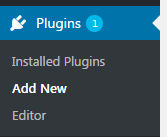
  2. Navigate to Plugins > Add New install cleantalk plugin
  3. Click "Upload Plugin" button towards your top-left. upload plugin
  4. Locate the zip file and hit "Install Now" install plugin
  5. Click "Activate Plugin" activate plugin
  6. On the next page in order to enable anti-spam protection, you will need to enter a free access key. Click "Get access key automatically button"
    enter the access key
    You will also receive emails about your account activation. cleanTalk emails
  7. Enable the "SpamFireWall" Option protection is active
  8. Click Advanced settings links at the bottom and enable the following options:
    • Allow spam comments to be automatically deleted upon detection. CleanTalk Advanced Settings
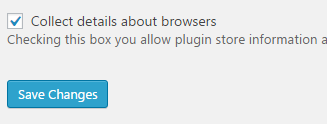
    • Check "collect details about browsers" option CleanTalk Settings for Wordpress 
    You can enable other options such ass SSL and Woocommerce checkout form if you are using them else leave all options as default.
  9. Click "Save Changes" and you are done with the installation!

CleanTalk Dashboard and Spam Analytics

Next Click the link that says "Check comments for spam" from your navbar:
Check Comments for Spam using CleanTalk
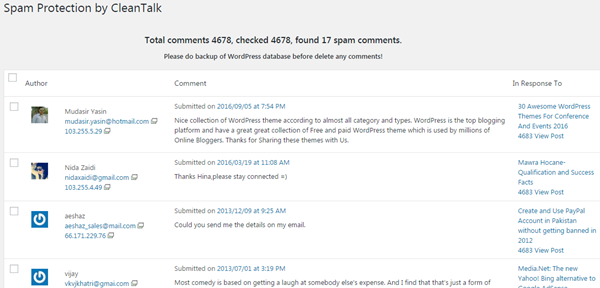
This is the result I got:
Spam Comments detected by CleanTalk
All my 4678 comments were instantly scanned and 17 spam comments were detected and removed. Please note that those 17 comments were ignored by Akismet Plugin which I previously used. This shows how effective and accurate CleanTalk is in detecting and blocking spam.
You can also check users for spam to see if any of your co-author or contributor may be misusing the site in any way.

CleanTalk Helps To Block Users By Country/IP/Email

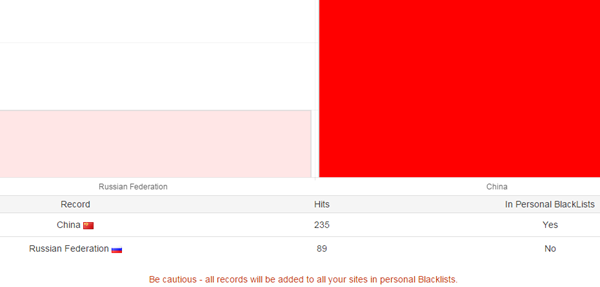
If you click the "CleanTalk Dashboard" link you will see tons of options to moderate your site comments. An AntiSpam log is updated every 3 minutes to inform you about the spam protection activity going on your site. By the time I am writing this article, several spammers from China and Russia have already started attacking my sites with spam contact emails as shown below:

Spam contact emails
AntiSpam log mentions everything about the content being blocked or approved. It will tell you the Author name, email, IP address and also show the content. Clicking the details link will show you the spam content which was posted to my Contact form:

block spam contact emails in wordpress
Clicking the IP address will disclose full identity of the spammer. You can choose to blacklist the spammer by email ID, IP address or even by country name.
IP address of spammer
blacklist spammer
The Blacklist option is my personal favorite and helps me block a bulk of spammers at once using the country option. Since my content is in English, people from China and Russia are surely not my intended audience so blocking these countries could surely save me bandwidth and decrease load on servers.
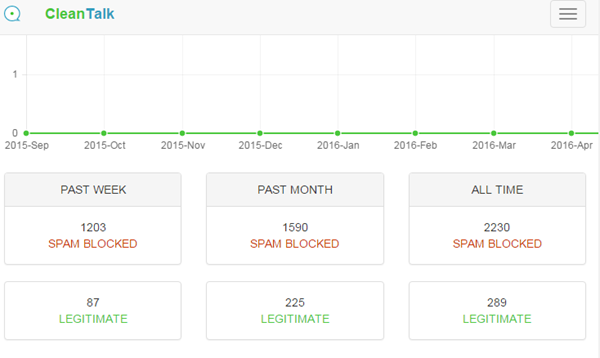
The "Trends" page shows you interesting info using graphical illustration about the total number of blocked and approved/legitimate comments


CleanTalk Trends Report
On the "Spam and legitimate hits" drop down box you can see who were the Top20 spammers on your site for the last week.


Check Top spammers on your site using CleanTalk

Top spammers on wordpress site

Tons of more such features that you can discover for yourselves that not only helps you better moderate your blog but significantly improve its load time and SEO in long run.

How To Signup for CleanTalk Spam Protection?

CleanTalk offers a free trial for 7 days only after which it will start charging $8/year which isn't that much as compared to the quality service it provides for an entire year. I am also greatly impressed by their instant 24/7 free help and customer support. Since I have two sites, I am looking forward to upgrade my plan. Currently $8/year plan best suits our requirements.
Paying for a year of anti-spam service, you save a lot more and receive:
  • Up to 99.998% protection from spam bots.
  • Time and resources saving.
  • More registrations/comments/visitors.
  • Protection of the several websites at once in different CMS.
  • Ease in installation and using.
  • Traffic increase and loyalty to the users.
  • 24/7 technical support.
  • Clear statistics.
  • No captcha (reCaptcha), puzzles, etc.
  • Free mobile app to control anti-spam function on your website.
Additional features
  • Daily and weekly detailed anti-spam reports: traffic VS spam.
  • Apps for iPhone, Android to control anti-spam service, comments, signups, contacts, traffic and spam statistics for the last 7 days.
  • AntiSpam apps for most popular CMS on cleantalk.org.

How Do You Protect Your Sites From Spam?

I am sure spam is a headache for us all. I have shared my experience of Akismet and CleanTalk. Please share your precious views on both of them and have you tried CleanTalk yet?
 
Can you image how much spam I used to receive through my Wordpress site's contact form alone? See the Gmail screenshot below and imagine how at piece would I be today? =)

Spam in gmail

CleanTalk Anti-Spam Plugin Review
Published
Summary CleanTalk Anti-Spam Plugin is the best WordPress Plugin for spam protection against fake comments, signups, contact emails and much more.
Reviewer
Publisher My Blogger Tricks
Ratings 5/5

Best 'Yoast SEO' alternative in WordPress Plugins

YOAST SEO alternativeMost wordpress SEO Plugins including Yoast SEO are too overwrought and heavy-handed, especially for users who implement stuff like .htaccess, robots.txt and sitemaps via their own optimized methods. I love Yoast SEO plugin when it comes to optimizing blog posts and URL structure but I don't like it's XML sitemap generator tool which often fails to get all posts indexed by Google webmaster tools due to (maybe) its paginated format. For that I often use alternative plugins like Google XML sitemap to get the work done. Another issue with Yoast is that it does not provide keyword research support. You are not given keyword suggestions that could help you target quality organic traffic.

As a result of all these deficiencies, we researched and played with various WordPress SEO plugins but rarely did I find anyone plugin as advanced in features as WebTextTool (WTT). Indeed Yoast combined with webtexttool provides you with ultimate support to make your content SEO proof.

Install Webtexttool in your WordPress site

Before we begin I would recommend that you first install Webtexttool SEO plugin from WordPress plugin directory and activate it using your Webtexttool username and password.

  1. Go to the Plugins tab in your WordPress dashboard and select Add New.
  2. Type in webtexttool in the Search Plugins box.
    Note: Webtexttool has launched their WP SEO Plugin just few weeks ago, we are lucky to have tried it first since we are already subscribed to WebTextTool's silver plan. Webtexttool SEO Plugin
  3. Press Install Now to install the plugin.
  4. Activate the webtexttool plugin from the Plugins menu in WordPress.
  5. Webtexttool will now appear in your WordPress dashboard [on the left]. Webtexttool SEO Plugin for wordpress
  6. Click on webtexttool and login using your webtexttool credentials. If you don't have an account, you can create one for free in the plugin.

    Webtexttool SEO Plugin

Once installed correctly you will see it being displayed to the right of your WordPress editor.

Webtexttool Wordpress SEO Plugin 

you will also see a meta description box at top for easy access:

webtexttool meta description box

How To Use Webtexttool on a non-Wordpress site?

If incase you don't have a wordpress site and run a blogger blog or squarespace blog or tumblr, you can still use all WebTexttool tools, features and services by directly using their web application which can be found here.

Is WebTextTool The Best Yoast alternative?

It will be injustice to compare both these great plugins but satisfying a customer need is sometimes  impossible using a single tool or plugin. Sometimes you need to try out multiple things at the same time to achieve your desired objective. Optimizing wordpress sites is no more a complicated job or too techy task for bloggers today thanks to these easy to handle DIY plugins like WebTextTool and Yoast. This article will help you identify how webtexttool has a better front-end UI edge over Yoast and what are the unique webtexttool tools that Yoast does not support so far.

Yoast vs. WebTextTooL

Following are some areas where I found webtexttool extremely handy to use and more productive compared to Yoast SEO Plugin:

  1. Advanced Keyword Suggestion Tool
  2. More illustrative (no mess-up)
  3. More Descriptive and precise
  4. Real-time SEO Page Score tool
  5. Tracks Google Rank and Progress

1. Advanced Keyword Suggestion Tool

Yes webtexttool (WTT) has surely nailed Yoast in this feature without doubts! Our team is now addicted to WTT's awesome keyword research functionality that helps us find best keywords for our content based on Volume reach and competition. I have written a detailed tutorial where I explained step by step on how to do keyword research before writing your blog post.

For example I recently optimized our co-author Nida's post at richincomways using webtexttool:

Her blog post was on how Swede Mason became popular at youTube. So I picked the primary keyword as "Swede mason" to see what other possible keyword combinations we could use inside the post that people will be interested to search for.

webtexttool keyword suggestions After clicking the "Give me suggestions" button, these were the related keywords I got:

webtexttool keyword suggestions

I came to realize that he was more popularly searched as masterchef. Thus the idea clicked and we integrated these keywords in the blog post.

2. More illustrative (no mess-up)

The following is the content analysis reported displayed by YOAST SEO plugin:

Thing I didn't like is that all data is shown in one single bullet list in one go with no headings or illustration. This often gives content writers a headache and provides poor readability.

Yoast content Analysis

and following is the real-time optimization suggestions and analysis report displayed by WebTexTool.

Which one do you think is more illustrative? I let you guys to decide.

Webtexttool realtime SEO suggestions in wordpress

3. More Descriptive and precise

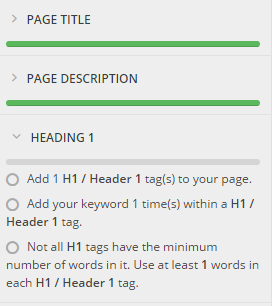
WebTextTool highlights each important SEO element in a separate section and gives you suggestions on how to improve it. Whether it be the image tags, meta description, title length, keyword density, intelligent use of Bold/italic text or heading tags, you are given clear and precise suggestions on how to make your content even more optimized and presentable for search robots.

Clicking any section will toggle display the best SEO practices that you need to follow in order to optimize your article.

webtexttool SEO suggestions

4. Real-time SEO Page Score tool

How can you get a quick idea of how optimized your blog post is? The only was to know that is through a scaling parameter that could quickly keep you updated with your optimization score. The higher your score, the better your content SEO. For this webtexttool makes use of a real-time SEO Page Score tool that automatically scans your content and calculates its SEO score based on the SEO techniques you applied. 

Webtexttool SEO Page Score

This score is all that matters for you now. As long as your score is above 80% you are good to go!

5. Tracks Google Rank and Progress

This is another unique feature of WTT that helps you track the Google rank of your published blog posts. I have written a detailed tutorial on how to track the SERPs rank of your blog using WebtextTool. Please read it for perfect clarification.

Shall you Stop using YOAST SEO Plugin?

No you must not!

Yoast is an excellent SEO plugin that can help you in several other ways. You can continue using it to optimize your URL and permalink structure, edit your .htaccess, robots.txt files and choose which pages to index. Yoast can also help you with real-time snippet preview.

As far as blog post content optimization is concerned I strongly recommend that you use webtexttool for major boost in your on-page optimization rankings. Your content is the only thing that matters more, it's the sole of your blog and is responsible for bringing you both traffic and search penalties. If you are careful in optimizing it, you will see your search organic graph climbing up and up. 

Have your tried WebTextTool yet?

Webtexttool SEO plugin has just been recently launched. Let me know how many of you are already using it and how has it helped you in better optimizing your wordpress sites. Our entire network blogs are now optimized using WTT and we have so far seen productive results. Do share your insights on this latest SEO plugin.

Feel free to ask for any help or assistance in the comment box below. Peace and blessings buddies. Wish you a healthy and optimized blogging career! =)

WordPress Floating Sharing Bar With Animation

Today we will discuss how to install Jumbo Share Counters [Floating Sharing bar] in WordPress themes. We already discussed the installation steps of floating sharing bar for BlogSpot Blogs and today we will share the PHP script for WordPress blogs that will help you display animated sharing counters for popular social media networks. The sharing bar can easily be aligned to the left or right of your blog posts. It will show only when the user scrolls down the page and will disappear the moment user scrolls to comment section of your blog. This technique immensely increases user engagement  and social shares of your content thus leading to a much better referral traffic. The plugin loads extremely fast and is built with Pure CSS, HTML and JavaScript with slight support for PHP to fetch the JSON share counts through Donreach sharing count API.

Floating Sharing Bar For WordPress themes

Before we could begin, you must first install JSC plugin in your WordPress blogs by following the steps mentioned in this tutorial:

DEMO (Scroll down for bar to appear)

JSC WordPress plugin by default includes the following 8 popular share buttons:

  1. Facebook
  2. GooglePlus +1
  3. Twitter
  4. LinkedIn
  5. Pinterest
  6. StumbleUpon
  7. Buffer
  8. Print

The viber and whatsapp share buttons will display only in mobile devices such as smartphones inside Horizontal sharing bar and not inside Floating sharing bar. These two buttons allow users to share your blog posts with their viber and whatsapp contacts, therefore they make sense only for mobile devices and not for desktop users.

Before Expanding:

WordPress Floating Sharing Bar - Collapsed

Make sure you add both the horizontal and floating sharing bars for maximum social share impact. By default the Horizontal counter will display on both desktop and mobile devices but the floating counters will display only in desktop screens. This is a standard way to display sharing bars.

JSC Floating Sharing Bar is the most advanced PHP driven FREE sharing plugin built for Blogger templates, WordPress themes (and other platforms) that works perfectly with all CMS platforms. You can now easily add branded sharing buttons in your wordPress themes without paying a penny. It is far more advanced than AddThis's Jumbo Share Counter plugin which costs $10/month!

After Expanding:

WordPress Floating Sharing Bar - Expanded

The following features makes it the most advanced sharing plugin:

  • Mobile responsive,
  • SEO friendly,
  • Lightweight & Lightening fast,
  • Animated number counter on scroll,
  • Natural in design
  • Customizable
  • Expand/Collapse option
  • Hosted on cloud servers 
  • No copyright links
  • Free of cost!

Lets get straight to work!

Install Floating Jumbo Sharing bar in WordPress

Follow these easy steps:

1 Go to your WordPress Dashboard > Appearance > Editor

2 Choose the stylesheet file i.e. style.css and paste the following CSS code at the bottom of style.css

(PS: If you have already added Horizontal Sharing bar inside your themes then please update that CSS code with this updated one)

Note:
Please Keep your FileZilla FTP connected, you may need it to restore function.php file if in case something goes wrong.

/* ##### FREE JUMBO SHARE COUNTERS ####### */
#MBTshares-wrap{margin:20px 0px;overflow:hidden; border-top: 1px dotted #eee;padding: 10px 0;border-bottom: 1px dotted #eee;}
#MBTshares{display:inline-block;overflow:hidden;text-align:left;white-space:nowrap;font-family:arial;font-size:11px;margin:0px 5px 0; line-height: 1.4em!important;}
#horiz{position:relative; padding:0; margin:0;}
#horiz #MBTshares{position:relative;top:-8px; padding-top:20px;}
#MBTshares a:hover{text-decoration:none!important;}

/***Facebook***/
.mbt-fb{background:transparent linear-gradient(#4C69BA,#3B55A0) repeat scroll 0 0;border:medium none;border-radius:2px;color:#FFF!important;cursor:pointer;font-weight:700;height:20px;line-height:20px;padding:0 6px;white-space:nowrap;text-shadow:0 -1px 0 #354C8C}
.mbt-fb:focus,.mbt-fb:hover,.mbt-fb:active{background:transparent linear-gradient(#5B7BD5,#4864B1) repeat scroll 0 0;border-color:#5874C3 #4961A8 #41599F;box-shadow:0 0 1px #607FD6 inset}
.mbt-fb i{padding:2px 2px 0 4px;font-size:11px;color:#3B5998;background:#fff;margin-right:4px;margin-top:3px}
.mbt-fb:hover, .mbt-fb:visited, .mbt-tw:hover,.mbt-tw:visited, .mbt-linkedin:hover ,.mbt-linkedin:visited{color:#fff!important;}

/***Gplus, Pinit, Stumbleupon***/
.mbt-gp{box-shadow:0 1px 0 rgba(0,0,0,0.05);background-color:#FFF;background-image:none;border-radius:2px;border:1px solid rgba(0,0,0,0.17);color:#262626!important;cursor:pointer;font-weight:700;height:20px;line-height:20px;padding:0 6px 0 4px;white-space:nowrap}
.mbt-gp:hover, .mbt-gp:visited{color:#262626!important;}
#MBTshares .pinit{background:#f9f9f9!important}
#MBTshares .stumb{background:#f0fafe!important;border:1px solid #cde3ea}
#MBTshares .stumb:hover{border:1px solid #b7d5df;box-shadow:0 1px 0 rgba(0,0,0,0.1)}
#MBTshares .stumb i{color:#eb4823!important;font-size:13px!important;margin-top:1px!important}
.mbt-gp:focus,.mbt-gp:hover,.mbt-gp:active{border:1px solid rgba(0,0,0,0.25);box-shadow:0 1px 0 rgba(0,0,0,0.1)}
.mbt-gp i{padding:2px 2px 0 0;font-size:11px;color:#DB4437;margin-right:2px;margin-top:3px}
.mbt-gp .fa-pinterest{padding:0 2px 0 0;font-size:14px}
#MBTshares .bufferimg{width:15px; margin-top:2px; padding:0 1px 0 0; }

/***LinkedIn***/
.mbt-linkedin{transition:background-color .218s ease 0s,border-color .218s ease 0s,box-shadow .218s ease 0;background-color:#0077B5;text-shadow:0 -1px #005887;border:medium none;border-radius:2px;border:1px solid #066094;color:#fff!important;cursor:pointer;font-weight:700;height:20px;line-height:20px;padding:0 2px 0 1px;white-space:nowrap}
@media screen and (-webkit-min-device-pixel-ratio:0) {
.mbt-linkedin{padding:0 5px 0 1px}
}

.mbt-linkedin:focus,.mbt-linkedin:hover,.mbt-linkedin:active{border:1px solid #0369A0;background-color:#0369A0}
.mbt-linkedin i{padding:0;font-size:17px;color:#FFF;margin-right:0;position:relative;left:1px}
.mbt-linkedin .ibg{background:#0369A0 none repeat scroll 0 0;width:17px;display:inline-block;border-right:1px solid #006095;border-radius:2px;height:20px;padding:0 2px 0 1px;margin:0 2px 0 -1px}

/**Twtter, Print, Whatsapp, viber**/
.mbt-tw{position:relative;height:22px;padding:4px 8px 1px 4px;font-weight:700;color:#FFF!important;cursor:pointer;background-color:#1B95E0;border-radius:3px;box-sizing:border-box}
.mbt-tw:focus,.mbt-tw:hover,.mbt-tw:active{background-color:#0C7ABF}
.mbt-tw i{padding:0 0 0 1px;font-size:14px;color:#fff;margin-right:2px;margin-top:0}
.mbt-o{max-width:100%}
.mbt-o,.mbtcount-o,.mbt-fb,.mbt-gp,.mbt-linkedin,.mbt-tw,.label,#mbtcount{display:inline-block;vertical-align:top}
.label {margin-left: -1px !important;}
.mbtcount-o{position:relative;min-width:15px;height:17px;text-align:center;padding:1px 5px;margin-left:5px;background:#FFF none repeat scroll 0 0;border:1px solid #e7e7e7;border-radius:2px; }
#MBTshares .printme {background-color:#333;}
#MBTshares .printme:focus,#MBTshares .printme:hover,#MBTshares .printme:active{background-color:#000}
#MBTshares .whatsapp{background-color:#73D40B;}
#MBTshares .whatsapp i{font-size:15px!important;}
#MBTshares .whatsapp:focus,#MBTshares .whatsapp:hover,#MBTshares .whatsapp:active{background-color:#65BA09}
#MBTshares .viber{background-color:#7b519d;}
#MBTshares .viber:focus,#MBTshares .viber:hover,#MBTshares .viber:active{background-color:#8558aa}
#MBTshares .viberimg{width:13px; margin-top:0px; padding:0 3px 0 0; }

#mbtcount{color:#666;white-space:nowrap;text-decoration:none;padding:2px 0 0}
#mbtcount:hover{text-decoration:none}
#MBTshares .arrow{height:0;left:-10px;position:relative;top:-15px;width:5px;z-index:2}
#MBTshares .ext{min-height:18px!important}
#MBTshares .arrow s,#MBTshares .arrow i{border-color:transparent #e7e7e7;border-style:solid;border-width:4px 5px 4px 0;display:block;position:relative;top:19px}
#MBTshares .arrow i{border-right-color:#FFF;left:2px;top:11px}
.share-btn{position:relative;display:inline-block}
.share-btn .h2{font-size:30px;font-weight:700;font-family:arial;color:#73D40B;height:31px; line-height: 1.4em;}
.share-btn .h4{font-size:12px;font-family:arial}

/*#########Floating Counter Styles###########*/
.mbt-vertical{max-width:60px!important;margin:0 0 0 -98px!important;border:1px solid #f3f3f3!important;padding:3px 6px 0!important;background:#fff; position: fixed;z-index:99999;bottom: 7%;float: left;border-right:0px solid #fff!important;}
.mbt-vertical #MBTshares{display:block;width:60px;margin:7px 0!important}
.tcount{margin:0 10px 0 0;text-align:center;min-width:60px;border-right:3px solid #73D40B;padding:0 15px 0 10px}
.mbt-vertical .tcount{border-right:0;padding:0;text-align:center;height:auto}
.tcount .h2{font-size:29px;padding-bottom:5px}
.tcount .h4,.mbt-vertical .tcount .h4{font-size:12px;padding-bottom:5px;border-radius:0}
.mbt-vertical .tcount .h4{border-bottom:3px solid #73D40B}
.mbt-vertical .mbt-o,.mbt-vertical .mbtcount-o,.mbt-vertical .mbt-fb,.mbt-vertical .mbt-gp,.mbt-vertical .mbt-tw,.mbt-vertical #mbtcount{display:block}
.mbt-vertical .mbtcount-o{margin-bottom:7px;margin-left:0;height:30px}
.mbt-vertical #mbtcount{padding:7px 0 0;font-size:15px;color:#666}
.arrow-v{bottom:-8px;height:7px;left:25px;position:absolute;width:0;z-index:2}
.arrow-v s,.arrow-v i{border-color:#e7e7e7 transparent transparent;border-style:solid;border-width:5px;display:block;position:relative}
.arrow-v i{border-top-color:#FFF;left:0;top:-12px}

/*#########Vertical Counter Switch###########*/
.switchoff{display:none}
.mbtswitch{padding:0 16px;margin:0 0 5px;display:block;max-width:60px;height:20px;cursor:pointer;background-color:#fff;border:1px solid #eee;border-radius:2px;outline:0 none;font:16px fontawesome;color:#ddd}
.mbtswitch:hover{color:#73D40B}
.mbtswitch i.active:after{content:'\f067';position:relative;left:7px;top:2px;font-style:normal}
.mbtswitch i.inactive:after{content:'\f068';position:relative;left:7px;top:2px;font-style:normal}

/*#########Horizontal Counter Switch###########*/
.switchoff2{display:inline-block;}
.mbtswitch2{padding:0 15px 0 3px;position:relative;top:-15px;margin:20px 0 0 3px;display:inline-block;max-width:30px;height:20px;cursor:pointer;background-color:#fff;border:1px solid #eee;border-radius:2px;outline:0 none;font:16px fontawesome;color:#ddd}
.mbtswitch2:hover{color:#73D40B}
.mbtswitch2 i.active:after{content:'\f067';position:relative;left:7px;top:2px;font-style:normal}
.mbtswitch2 i.inactive:after{content:'\f068';position:relative;left:7px;top:2px;font-style:normal}
@media only screen and (max-width:230px) {
.tcount{border-bottom: 2px solid #74D50C; border-right:none; min-width:100%;}
#horiz #MBTshares {width: 100%;}
}

@media only screen and (max-width:500px) {
.mbt-vertical{display:none;} }

Customization:

  • If you wish to float the sharing bar to the right side of your blog post then simply replace float: left; with float: right;
  • To adjust the position of the sharing bar play with its margin values by editing margin:0 0 0 -98px
  • To decide at what position (how high/up) you wish to locate the widget from the base of the browser then edit bottom: 7%;
  • To change the green font color of the Jumbo Share count kindly edit #73D40B

3 Click Update file

4 Choose "Theme Functions" file also known as functions.php

5 At the bottom of this file, paste the following Code:

//Jumbo Share Counters Plugin

function jumbo_shares_floating($content){

if (is_single()) {   

    $content .= '
<div class="mbt-vertical" id="MBTshares-wrap" style="display:none;">

<!--TOTAL-->

<div class="share-btn tcount" data-service="total">
<div class="count h2 anim"></div>
<div class="h4">SHARES</div>
</div>

<!--FACEBOOK -->

<div id="MBTshares"  >
<div class="mbtcount-o" >
<div class="arrow-v"><s></s><i></i></div>
<span class="share-btn" data-service="facebook">
<span id="mbtcount" class="count anim"></span></span>
</div>
<div class="mbt-o" >
<a rel="nofollow" href="http://www.facebook.com/sharer.php?u='.get_permalink( $post->ID).'&amp;t='.get_the_title( $post->ID).'" onclick="window.open(this.href, \'sharer\', \'toolbar=0, scrollbars,status=0,  width=626,height=436\');  return false;" target="_blank" title="Share on Facebook!" class="mbt-fb"><i class="fa fa-facebook"></i><span class="label">Share</span></a>
</div>
</div>

<!--GOOGLE PLUS-->

<div id="MBTshares"  >
<div class="mbtcount-o" >
<div class="arrow-v"><s></s><i></i></div>
<span class="share-btn" data-service="google">
<span id="mbtcount" class="count anim"></span></span>
</div>
<div class="mbt-o" >
<a rel="nofollow" href="https://plus.google.com/share?url='.get_permalink( $post->ID).'" onclick="window.open(this.href, \'sharer\', \'toolbar=0, scrollbars,status=0,  width=626,height=436\');  return false;" target="_blank" title="Share on Google Plus!" class="mbt-gp"><i class="fa fa-google-plus"></i><span class="label">Share</span></a>
</div>
</div>

<!--TWITTER-->

<div id="MBTshares">
<div class="mbt-o">
<a rel="nofollow" href="http://twitter.com/home/?status='.get_the_title( $post->ID).' - '.get_permalink( $post->ID).'" onclick="window.open(this.href, \'sharer\', \'toolbar=0, scrollbars,status=0,  width=626,height=436\');  return false;" target="_blank" title="Share on Twitter!" class="mbt-tw"><i class="fa fa-twitter"></i><span class="label">Tweet</span></a>
</div>
</div>

<!--PINTEREST-->

<div id="MBTshares"  >
<div class="mbtcount-o" >
<div class="arrow-v"><s></s><i></i></div>
<span class="share-btn" data-service="pinterest">
<span id="mbtcount" class="count anim"></span></span>
</div>
<div class="mbt-o" >
<a rel="nofollow" href="http://pinterest.com/pin/create/button/?url='.get_permalink( $post->ID).'&media='.wp_get_attachment_url( get_post_thumbnail_id($post->ID) ).'&description='.get_the_title($post->ID).'" onclick="window.open(this.href, \'sharer\', \'toolbar=0, scrollbars,status=0,  width=626,height=436\');  return false;"  target="_blank" title="Pin it!" class="mbt-gp pinit"><i class="fa fa-pinterest"></i><span class="label">Pin it</span></a>
</div>
</div>

<div style="display:none;" class="switchoff">

<!--STUMBLEUPON-->

<div id="MBTshares"  >
<div class="mbtcount-o" >
<div class="arrow-v"><s></s><i></i></div>
<span class="share-btn" data-service="stumbleupon">
<span id="mbtcount" class="count anim"></span></span>
</div>
<div class="mbt-o" >
<a rel="nofollow" href="http://www.stumbleupon.com/submit?url='.get_permalink( $post->ID).'&amp;title='.get_the_title( $post->ID).'" onclick="window.open(this.href, \'sharer\', \'toolbar=0, scrollbars,status=0,  width=626,height=436\');  return false;" target="_blank" title="Stumble it!" class="mbt-gp stumb"><i class="fa fa-stumbleupon"></i><span class="label">Share</span></a>
</div>
</div>

<!--LINKEDIN-->

<div id="MBTshares"  >
<div class="mbtcount-o" >
<div class="arrow-v"><s></s><i></i></div>
<span class="share-btn" data-service="linkedin">
<span id="mbtcount" class="count anim"></span></span>
</div>
<div class="mbt-o" >
<a rel="nofollow" href="http://www.linkedin.com/shareArticle?mini=true&amp;title='.get_the_title( $post->ID).'&amp;url='.get_permalink( $post->ID).'" onclick="window.open(this.href, \'sharer\', \'toolbar=0, scrollbars,status=0,  width=626,height=436\');  return false;" target="_blank" title="Share on Linkedin!" class="mbt-linkedin"><span class="ibg"><i class="fa fa-linkedin"></i></span><span class="label">Share</span></a>
</div>
</div>

<!--BUFFER-->

<div id="MBTshares">
<div class="mbtcount-o">
<div class="arrow-v"><s></s><i></i></div>
<span class="share-btn" data-service="buffer">
<span class="count anim" id="mbtcount"></span></span>
</div>
<div class="mbt-o">
<a class="mbt-gp" href="https://buffer.com/add?url='.get_permalink( $post->ID).'&picture='.wp_get_attachment_url( get_post_thumbnail_id($post->ID) ).'&text='.get_the_title( $post->ID).'&via=stc_network" onclick="window.open(this.href, \'sharer\', \'toolbar=0, scrollbars,status=0,  width=626,height=436\');  return false;" rel="nofollow" target="_blank" title="Share on Buffer!"><img class="bufferimg" src=" https://blogger.googleusercontent.com/img/b/R29vZ2xl/AVvXsEjyA3ZHz3H04uoelPqdYdIJKFLRpfJY_Cw1DegKfArqkLjDEfVyJpqE1MS7vdwbx2D89SNrceRyWS6jA_45-bgoJcxw-e-D7NjEl7GjseOqfIz2GZ-hfXjRbPaKbQBZyTjBxBjg63zmUZzW/s1600/logo-icon.png"/><span class="label">Buffer</span></a>
</div>
</div>

<!-- PRINT -->

<div id="MBTshares">
<div class="mbt-o">
<a class="mbt-tw printme" href="javascript:window.print()" rel="nofollow" target="_blank" title="Print this page!">
<i class="fa fa-print"></i><span class="label">Print</span></a>
</div>
</div>

</div> <!--switchoff-->
<span class="mbtswitch"><i class="active"></i></span>
</div>';
}
    return $content;
}

add_filter( "the_content", "jumbo_shares_floating" );

Customization Guide:

  • All button locations are labeled for easy readability. You can easily change/swap the locations of button within the widget.
  • Replace stc_network with your twitter username/handle
  • All buttons inside the purple highlighted tags will remain hidden when page loads and will be displayed only when the user clicks the +/- switch button. Buttons will display using this toggle button which we named the switch.
  • If you wish to add more buttons inside the switch then simply copy its code and paste it inside the purple switch tags.
  • To remove buttons from inside the switch, simply copy the button's code and paste it above the switch tag i.e. <div style="display:none;" class='switchoff'>

6Click Update File to save all your settings. All done! =)

Note: You wont be able to see the widget working without the steps discussed below. So you must also add the code shared below.

Fade In and Fade Out the Sharing bar

The floating sharing bar is invisible when a user lands on any of your page. It is displayed only when the user scrolls down, it will be shown as long as the user does not reach the comment section. In short the widget will be visible only next to the post content and not below it. This gives a professional touch to the plugin that is often adopted by leading corporate blogs.

7Add the code below just above </head> inside your theme:

<script type='text/javascript'>
// <![CDATA[
// Show hide Jumbo Share Counter
$(document).ready(function () {
var stickElement = $('.mbt-vertical'),
hideTrigger = $('#comments'),
top = stickElement.offset().top;
$(window).scroll(function (event) {
var y = $(this).scrollTop();
var maxY = hideTrigger.offset().top;
if (y < maxY) {
$('.mbt-vertical').fadeIn();
} else {
$('.mbt-vertical').fadeOut();
}});});
// ]]>
</script>
</b:if>
</b:if>

Make these changes if needed:

  • WordPress comment section contains this ID: #comments
  • The Sharing bar will fade out as soon as it reaches this section. You can use any class or ID you want before which you wish the sharing bar to disappear.

8 Save your settings and you are all done! =)

Need Help?

Feel free to post your queries below, I would love to help as soon as time allows. Jumbo Share counters have really increased our blog speed and referral traffic. I wish it helps you out as well and multiplies your traffic threefold. Peace and blessings buddies. =)


WordPress: Jumbo Share Counters Plugin

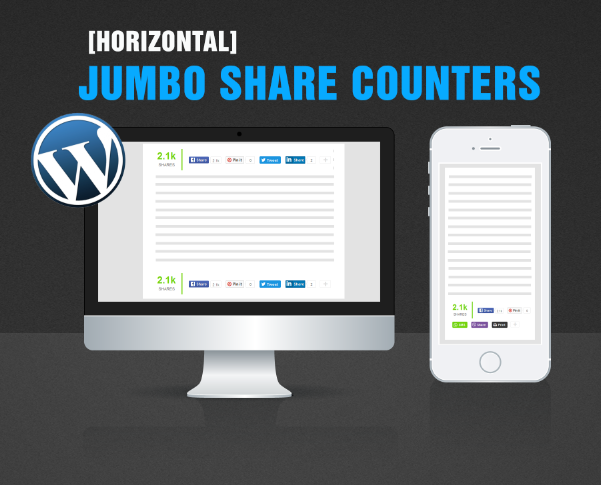
This tutorial will help you install Jumbo Share Counters Plugin on your WordPress sites and blogs. Jumbo Share Counters  (JSC) as you all know is a free cloud hosted social sharing plugin, which is the best alternative to official social media buttons. JSC buttons are mobile responsive, lightening fast, looks original in design and can be installed on all CMS platforms. Our plugin is free of cost and contains no copyrights backlinks. We are distributing it for free for the love of knowledge and community care.

JumboShare Counters Plugin For WordPress

Before we begin, kindly first install the necessary code which makes JSC plugin function by reading the tutorial below:

DEMO (Scroll to the bottom of post)

Before Expanding:

JumboShare Counter Plugin

After Expanding:

JumboShare Counters Plugin

Adding sharing buttons below post titles or at post footer are best locations to increase your social shares and social media referral traffic. You can now easily add branded sharing buttons in your wordPress themes at the bottom of blog posts without paying a penny. It is far more advanced than AddThis's Jumbo Share Counter plugin which costs $10/month!

JSC Horizontal Sharing Bar by default includes the following 10 popular share buttons:

  1. Facebook
  2. GooglePlus +1
  3. Twitter
  4. LinkedIn
  5. Pinterest
  6. StumbleUpon
  7. Buffer
  8. Viber
  9. Whatsapp
  10. Print

The following features makes it the most advanced sharing plugin:

  • Mobile responsive,
  • SEO friendly,
  • Lightweight & Lightening fast,
  • Animated number counter on scroll,
  • Natural in design
  • Customizable
  • Expand/Collapse option
  • Hosted on cloud servers 
  • No copyright links
  • Free of cost!

We have both Horizontal and Vertical Sharing bars in stake. Today we will learn how to install the Horizontal Jumbo Sharing bar in your Wordpress themes and later in our next tutorial we will also discuss how to install the vertical jumbo sharing bar in WordPress.

Lets get to work now!

Install Horizontal Jumbo Sharing bar in WordPress

Adding plugins in WordPress themes often require the use of hooks i.e. Actions and Filters. If you are using Genesis or Thesis frameworks then you can easily add the JSC plugin in any location you want but to make sure we keep the installation steps as simple as possible, I will share a standard method that will work on all frameworks.

NOTE:
Please Keep your FileZilla FTP connected, you may need it to restore function.php file if in case something goes wrong.

1. Go to your WordPress Dashboard > Appearance > Editor

2. Choose the stylesheet file i.e. style.css and paste the following CSS code at the bottom of style.css


/* ##### FREE JUMBO SHARE COUNTERS ####### */
#MBTshares-wrap{margin:20px 0px;overflow:hidden; border-top: 1px dotted #eee;padding: 10px 0;border-bottom: 1px dotted #eee;}
#MBTshares{display:inline-block;overflow:hidden;text-align:left;white-space:nowrap;font-family:arial;font-size:11px;margin:0px 5px 0; line-height: 1.4em!important;}
#horiz{position:relative; padding:0; margin:0;}
#horiz #MBTshares{position:relative;top:-8px; padding-top:20px;}
#MBTshares a:hover{text-decoration:none!important;}


/***Facebook***/
.mbt-fb{background:transparent linear-gradient(#4C69BA,#3B55A0) repeat scroll 0 0;border:medium none;border-radius:2px;color:#FFF!important;cursor:pointer;font-weight:700;height:20px;line-height:20px;padding:0 6px;white-space:nowrap;text-shadow:0 -1px 0 #354C8C}
.mbt-fb:focus,.mbt-fb:hover,.mbt-fb:active{background:transparent linear-gradient(#5B7BD5,#4864B1) repeat scroll 0 0;border-color:#5874C3 #4961A8 #41599F;box-shadow:0 0 1px #607FD6 inset}
.mbt-fb i{padding:2px 2px 0 4px;font-size:11px;color:#3B5998;background:#fff;margin-right:4px;margin-top:3px}
.mbt-fb:hover, .mbt-fb:visited, .mbt-tw:hover,.mbt-tw:visited, .mbt-linkedin:hover ,.mbt-linkedin:visited{color:#fff!important;}

/***Gplus, Pinit, Stumbleupon***/
.mbt-gp{box-shadow:0 1px 0 rgba(0,0,0,0.05);background-color:#FFF;background-image:none;border-radius:2px;border:1px solid rgba(0,0,0,0.17);color:#262626!important;cursor:pointer;font-weight:700;height:20px;line-height:20px;padding:0 6px 0 4px;white-space:nowrap}
.mbt-gp:hover, .mbt-gp:visited{color:#262626!important;}
#MBTshares .pinit{background:#f9f9f9!important}
#MBTshares .stumb{background:#f0fafe!important;border:1px solid #cde3ea}
#MBTshares .stumb:hover{border:1px solid #b7d5df;box-shadow:0 1px 0 rgba(0,0,0,0.1)}
#MBTshares .stumb i{color:#eb4823!important;font-size:13px!important;margin-top:1px!important}
.mbt-gp:focus,.mbt-gp:hover,.mbt-gp:active{border:1px solid rgba(0,0,0,0.25);box-shadow:0 1px 0 rgba(0,0,0,0.1)}
.mbt-gp i{padding:2px 2px 0 0;font-size:11px;color:#DB4437;margin-right:2px;margin-top:3px}
.mbt-gp .fa-pinterest{padding:0 2px 0 0;font-size:14px}
#MBTshares .bufferimg{width:15px; margin-top:2px; padding:0 1px 0 0; }


/***LinkedIn***/
.mbt-linkedin{transition:background-color .218s ease 0s,border-color .218s ease 0s,box-shadow .218s ease 0;background-color:#0077B5;text-shadow:0 -1px #005887;border:medium none;border-radius:2px;border:1px solid #066094;color:#fff!important;cursor:pointer;font-weight:700;height:20px;line-height:20px;padding:0 2px 0 1px;white-space:nowrap}
@media screen and (-webkit-min-device-pixel-ratio:0) {
.mbt-linkedin{padding:0 5px 0 1px}
}

.mbt-linkedin:focus,.mbt-linkedin:hover,.mbt-linkedin:active{border:1px solid #0369A0;background-color:#0369A0}
.mbt-linkedin i{padding:0;font-size:17px;color:#FFF;margin-right:0;position:relative;left:1px}
.mbt-linkedin .ibg{background:#0369A0 none repeat scroll 0 0;width:17px;display:inline-block;border-right:1px solid #006095;border-radius:2px;height:20px;padding:0 2px 0 1px;margin:0 2px 0 -1px}

/**Twtter, Print, Whatsapp, viber**/
.mbt-tw{position:relative;height:22px;padding:4px 8px 1px 4px;font-weight:700;color:#FFF!important;cursor:pointer;background-color:#1B95E0;border-radius:3px;box-sizing:border-box}
.mbt-tw:focus,.mbt-tw:hover,.mbt-tw:active{background-color:#0C7ABF}
.mbt-tw i{padding:0 0 0 1px;font-size:14px;color:#fff;margin-right:2px;margin-top:0}
.mbt-o{max-width:100%}
.mbt-o,.mbtcount-o,.mbt-fb,.mbt-gp,.mbt-linkedin,.mbt-tw,.label,#mbtcount{display:inline-block;vertical-align:top}
.label {margin-left: -1px !important;}
.mbtcount-o{position:relative;min-width:15px;height:17px;text-align:center;padding:1px 5px;margin-left:5px;background:#FFF none repeat scroll 0 0;border:1px solid #e7e7e7;border-radius:2px; }
#MBTshares .printme {background-color:#333;}
#MBTshares .printme:focus,#MBTshares .printme:hover,#MBTshares .printme:active{background-color:#000}
#MBTshares .whatsapp{background-color:#73D40B;}
#MBTshares .whatsapp i{font-size:15px!important;}
#MBTshares .whatsapp:focus,#MBTshares .whatsapp:hover,#MBTshares .whatsapp:active{background-color:#65BA09}
#MBTshares .viber{background-color:#7b519d;}
#MBTshares .viber:focus,#MBTshares .viber:hover,#MBTshares .viber:active{background-color:#8558aa}
#MBTshares .viberimg{width:13px; margin-top:0px; padding:0 3px 0 0; }

#mbtcount{color:#666;white-space:nowrap;text-decoration:none;padding:2px 0 0}
#mbtcount:hover{text-decoration:none}
#MBTshares .arrow{height:0;left:-10px;position:relative;top:-15px;width:5px;z-index:2}
#MBTshares .ext{min-height:18px!important}
#MBTshares .arrow s,#MBTshares .arrow i{border-color:transparent #e7e7e7;border-style:solid;border-width:4px 5px 4px 0;display:block;position:relative;top:19px}
#MBTshares .arrow i{border-right-color:#FFF;left:2px;top:11px}
.share-btn{position:relative;display:inline-block}
.share-btn .h2{font-size:30px;font-weight:700;font-family:arial;color:#73D40B;height:31px; line-height: 1.4em;}
.share-btn .h4{font-size:12px;font-family:arial}

/*#########Floating Counter Styles###########*/
.mbt-vertical{max-width:60px!important;margin:0 0 0 -83px!important;border:1px solid #f3f3f3!important;padding:3px 6px 0!important;background:#fff; position: fixed;z-index:99999;bottom: 7%;float: left;border-right:0px solid #fff!important;}
.mbt-vertical #MBTshares{display:block;width:60px;margin:7px 0!important}
.tcount{margin:0 10px 0 0;text-align:center;min-width:60px;border-right:3px solid #73D40B;padding:0 15px 0 10px}
.mbt-vertical .tcount{border-right:0;padding:0;text-align:center;height:auto}
.tcount .h2{font-size:29px;padding-bottom:5px}
.tcount .h4,.mbt-vertical .tcount .h4{font-size:12px;padding-bottom:5px;border-radius:0}
.mbt-vertical .tcount .h4{border-bottom:3px solid #73D40B}
.mbt-vertical .mbt-o,.mbt-vertical .mbtcount-o,.mbt-vertical .mbt-fb,.mbt-vertical .mbt-gp,.mbt-vertical .mbt-tw,.mbt-vertical #mbtcount{display:block}
.mbt-vertical .mbtcount-o{margin-bottom:7px;margin-left:0;height:30px}
.mbt-vertical #mbtcount{padding:7px 0 0;font-size:15px;color:#666}
.arrow-v{bottom:-8px;height:7px;left:25px;position:absolute;width:0;z-index:2}
.arrow-v s,.arrow-v i{border-color:#e7e7e7 transparent transparent;border-style:solid;border-width:5px;display:block;position:relative}
.arrow-v i{border-top-color:#FFF;left:0;top:-12px}

/*#########Vertical Counter Switch###########*/
.switchoff{display:none}
.mbtswitch{padding:0 16px;margin:0 0 5px;display:block;max-width:60px;height:20px;cursor:pointer;background-color:#fff;border:1px solid #eee;border-radius:2px;outline:0 none;font:16px fontawesome;color:#ddd}
.mbtswitch:hover{color:#73D40B}
.mbtswitch i.active:after{content:'\f067';position:relative;left:7px;top:2px;font-style:normal}
.mbtswitch i.inactive:after{content:'\f068';position:relative;left:7px;top:2px;font-style:normal}


/*#########Horizontal Counter Switch###########*/
.switchoff2{display:inline-block;}
.mbtswitch2{padding:0 15px 0 3px;position:relative;top:-15px;margin:20px 0 0 3px;display:inline-block;max-width:30px;height:20px;cursor:pointer;background-color:#fff;border:1px solid #eee;border-radius:2px;outline:0 none;font:16px fontawesome;color:#ddd}
.mbtswitch2:hover{color:#73D40B}
.mbtswitch2 i.active:after{content:'\f067';position:relative;left:7px;top:2px;font-style:normal}
.mbtswitch2 i.inactive:after{content:'\f068';position:relative;left:7px;top:2px;font-style:normal}
@media only screen and (max-width:230px) {
.tcount{border-bottom: 2px solid #74D50C; border-right:none; min-width:100%;}
#horiz #MBTshares {width: 100%;}
}

The stylesheet above can easily be customized if you wish. To change the green font color of the JumboShare count kindly edit #73D40B

3. Click Update file

4. Choose "Theme Functions" file also known as functions.php

5. At the bottom of this file, paste the following Code:

//Jumbo Share Counters Plugin
function jumbo_shares_after_post($content){
if (is_single()) {   
    $content .= '
<div id="MBTshares-wrap">

<!--TOTAL-->
<div class="share-btn tcount" data-service="total">
        <div class="count h2 anim"></div>
        <div class="h4">SHARES</div>
</div>
<span id="horiz">
<!--FACEBOOK -->
<div id="MBTshares"  >
<div class="mbt-o" >
<a rel="nofollow" href="http://www.facebook.com/sharer.php?u='.get_permalink( $post->ID).'&amp;t='.get_the_title( $post->ID).'" onclick="window.open(this.href, \'sharer\', \'toolbar=0, scrollbars,status=0,  width=626,height=436\');  return false;" target="_blank" title="Share on Facebook!" class="mbt-fb"><i class="fa fa-facebook"></i><span class="label">Share</span></a>
</div>
<div class="mbtcount-o" >
<div class="arrow"><s></s><i></i></div>
<span class="share-btn" data-service="facebook">
<span id="mbtcount" class="count anim"></span></span>
</div>
</div>

<!--GOOGLE PLUS-->
<div id="MBTshares"  >
<div class="mbt-o" >
<a rel="nofollow" href="https://plus.google.com/share?url='.get_permalink( $post->ID).'" onclick="window.open(this.href, \'sharer\', \'toolbar=0, scrollbars,status=0,  width=626,height=436\');  return false;" target="_blank" title="Share on Google Plus!" class="mbt-gp"><i class="fa fa-google-plus"></i><span class="label">Share</span></a>
</div>
<div class="mbtcount-o ext" >
<div class="arrow"><s></s><i></i></div>
<span class="share-btn" data-service="google">
<span id="mbtcount" class="count anim"></span></span>
</div>
</div>

<!--TWITTER-->
<div id="MBTshares"  >
<div class="mbt-o" >
<a rel="nofollow" href="http://twitter.com/home/?status='.get_the_title( $post->ID).' - '.get_permalink( $post->ID).'" onclick="window.open(this.href, \'sharer\', \'toolbar=0, scrollbars,status=0,  width=626,height=436\');  return false;" target="_blank" title="Share on Twitter!" class="mbt-tw"><i class="fa fa-twitter"></i><span class="label">Tweet</span></a>
</div>
</div>

<!--PINTEREST-->
<div id="MBTshares"  >
<div class="mbt-o" >
<a rel="nofollow" href="http://pinterest.com/pin/create/button/?url='.get_permalink( $post->ID).'&media='.wp_get_attachment_url( get_post_thumbnail_id($post->ID) ).'&description='.get_the_title($post->ID).'" onclick="window.open(this.href, \'sharer\', \'toolbar=0, scrollbars,status=0,  width=626,height=436\');  return false;"  target="_blank" title="Pin it!" class="mbt-gp pinit"><i class="fa fa-pinterest"></i><span class="label">Pin it</span></a>
</div>
<div class="mbtcount-o ext" >
<div class="arrow"><s></s><i></i></div>
<span class="share-btn" data-service="pinterest">
<span id="mbtcount" class="count anim"></span></span>
</div>
</div>
<div style="display:none;" class="switchoff2">
<!--STUMBLEUPON-->
<div id="MBTshares"  >
<div class="mbt-o" >
<a rel="nofollow" href="http://www.stumbleupon.com/submit?url='.get_permalink( $post->ID).'&amp;title='.get_the_title( $post->ID).'" onclick="window.open(this.href, \'sharer\', \'toolbar=0, scrollbars,status=0,  width=626,height=436\');  return false;" target="_blank" title="Stumble it!" class="mbt-gp stumb"><i class="fa fa-stumbleupon"></i><span class="label">Share</span></a>
</div>
<div class="mbtcount-o ext" >
<div class="arrow"><s></s><i></i></div>
<span class="share-btn" data-service="stumbleupon">
<span id="mbtcount" class="count anim"></span></span>
</div>
</div>

<!--LINKEDIN-->
<div id="MBTshares"  >
<div class="mbt-o" >
<a rel="nofollow" href="http://www.linkedin.com/shareArticle?mini=true&amp;title='.get_the_title( $post->ID).'&amp;url='.get_permalink( $post->ID).'" onclick="window.open(this.href, \'sharer\', \'toolbar=0, scrollbars,status=0,  width=626,height=436\');  return false;" target="_blank" title="Share on Linkedin!" class="mbt-linkedin"><span class="ibg"><i class="fa fa-linkedin"></i></span><span class="label">Share</span></a>
</div>
<div class="mbtcount-o ext" >
<div class="arrow"><s></s><i></i></div>
<span class="share-btn" data-service="linkedin">
<span id="mbtcount" class="count anim"></span></span>
</div>
</div>

<!--BUFFER-->
<div id="MBTshares">
<div class="mbt-o">
<a class="mbt-gp" href="https://buffer.com/add?url='.get_permalink( $post->ID).'&picture='.wp_get_attachment_url( get_post_thumbnail_id($post->ID) ).'&text='.get_the_title( $post->ID).'&via=stc_network" onclick="window.open(this.href, \'sharer\', \'toolbar=0, scrollbars,status=0,  width=626,height=436\');  return false;" rel="nofollow" target="_blank" title="Share on Buffer!"><img class="bufferimg" src=" https://blogger.googleusercontent.com/img/b/R29vZ2xl/AVvXsEjyA3ZHz3H04uoelPqdYdIJKFLRpfJY_Cw1DegKfArqkLjDEfVyJpqE1MS7vdwbx2D89SNrceRyWS6jA_45-bgoJcxw-e-D7NjEl7GjseOqfIz2GZ-hfXjRbPaKbQBZyTjBxBjg63zmUZzW/s1600/logo-icon.png"/><span class="label">Buffer</span></a>
</div>
<div class="mbtcount-o ext">
<div class="arrow"><s></s><i></i></div>
<span class="share-btn" data-service="buffer">
<span class="count anim" id="mbtcount"></span></span>
</div>
</div>


<!-- VIBER -->
  <div id="MBTshares">
    <div class="mbt-o">
      <a class="mbt-tw viber" href="viber://forward?text='.get_the_title( $post->ID).' >> '.get_permalink( $post->ID).'"  rel="nofollow" target="_blank" title="Share on viber!"><img class="viberimg"       src=" https://blogger.googleusercontent.com/img/b/R29vZ2xl/AVvXsEjZqVZAbUXH53EfPWSkwABH7k_XS3NUOn9lvOH5zH29pV-ywuTKHRHQ-iJ5GcjUZFVI3wU1jB08fKlMvqYqJhvNCI84_QETbXTFCRusx4iD7aq3dMQ8_kN3pquWZNcDYCvnoekF11O0bpg8/s1600/Icon_small.png"/><span       class="label">Share</span></a>
    </div>
  </div>

<!-- WHATSAPP -->
  <div id="MBTshares">
    <div class="mbt-o">
      <a class="mbt-tw whatsapp" href="whatsapp://send?text='.get_the_title( $post->ID).' >> '.get_permalink( $post->ID).'"  rel="nofollow" target="_blank" title="Share on whatsapp!"><i class="fa fa-whatsapp"></i>      <span class="label">SMS</span></a>
    </div>
  </div>
  <!-- PRINT -->
  <div id="MBTshares">
    <div class="mbt-o">
      <a class="mbt-tw printme" href="javascript:window.print()" rel="nofollow" target="_blank" title="Print this page!">
      <i class="fa fa-print"></i><span class="label">Print</span></a>
    </div>
  </div>

</div> <!--switchoff-->

<span class="mbtswitch2"><i class="active"></i></span>
</span>
</div>';
}
    return $content;
}

add_filter( "the_content", "jumbo_shares_after_post" );

Replace stc_network with your twitter handle/username.

6. Click Update File to save all your settings. All done! =)

You have now successfully placed the Jumbo Share Counters at the bottom of your blog posts only. The sharing bar will not display on your homepage, archives or pages but will display only on your blog posts. Visit your blog to see it working just fine. You can now safely remove any slow-loading social media plugin that you may be using because JSC is all that you need now.

If you are looking for a BlogSpot Widget for this plugin, please read the following tutorial:

Have questions on WordPress Jumbo Share Counters?

Feel free to ask for any help needed. I would love to answer all your queries. If you wish to locate the sharing bar below WordPress post titles or on any other location, feel confident to post your queries. In our coming tutorials we will publish tutorials on how to add vertical Jumbo Sharing bar in WordPress and BlogSpot blogs. I just hope this plugin may engage your visitors more on your site and help you with a major boost in referral traffic. Peace and blessings buddies! =)